
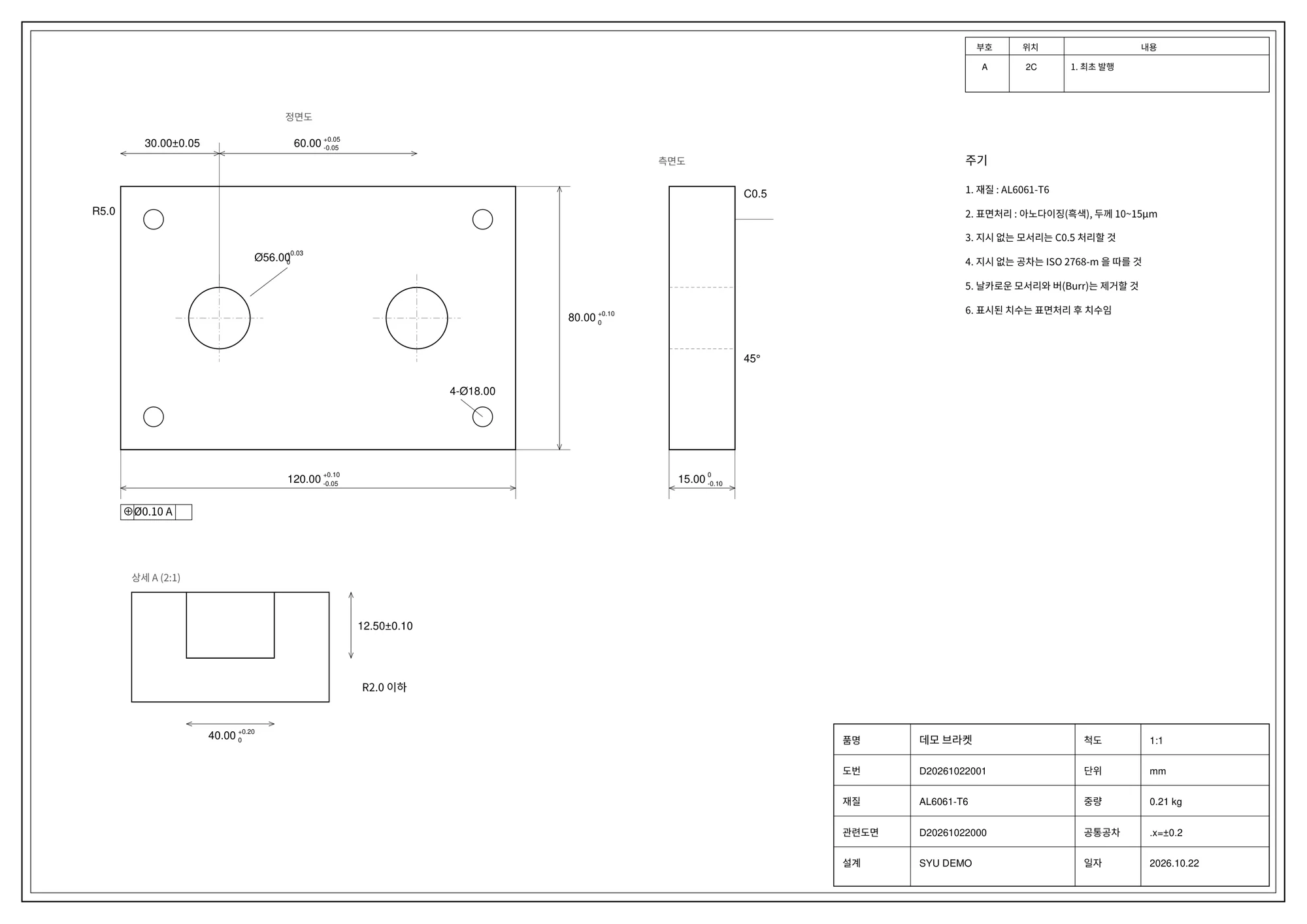
01 · Import the drawing PDF
Start with CAD-exported or printed PDFs, including multi-page drawing sets, using folder monitoring or screen upload.
Company
CEO MessageWhy we started SYU OverviewMission, business, company facts HistoryFrom 2023 to today Certifications & IP3 patents, PCT, ISO LocationBusan, Korea CareersWork with usBusiness
AI Procurement SoftwareSYU ONE and ERIGO by subscription MRO & Food SupplyShinsunhae store, shared items supplied Systems IntegrationERP integration and maintenanceProducts
SYU ONEChat orders into system dataERIGOProcurement & supply chainS-LLMIn-house local LLMSYU OCRDrawing recognition · review · inspection reportsYeogak WMSReceiving · Inventory · External warehouses · ClosingIntegration & purchase controlKeep your ERP and approvalsOnchaeRent management appMECLMedical waste collection · Dispatch · BillingShinsunhaeSeafood · Ingredients · Kitchen supplies
Extract dimensions, tolerances and notes from drawing PDFs, review the inspection items, and produce reports in your company’s format. Processing runs on an on-premises PC without an internet connection.
Quality and inspection teams check dimensions and tolerances, then prepare inspection items and report forms. SYU OCR assists with this preparation. People review the recognition results; inspectors perform the actual measurements and acceptance decisions.
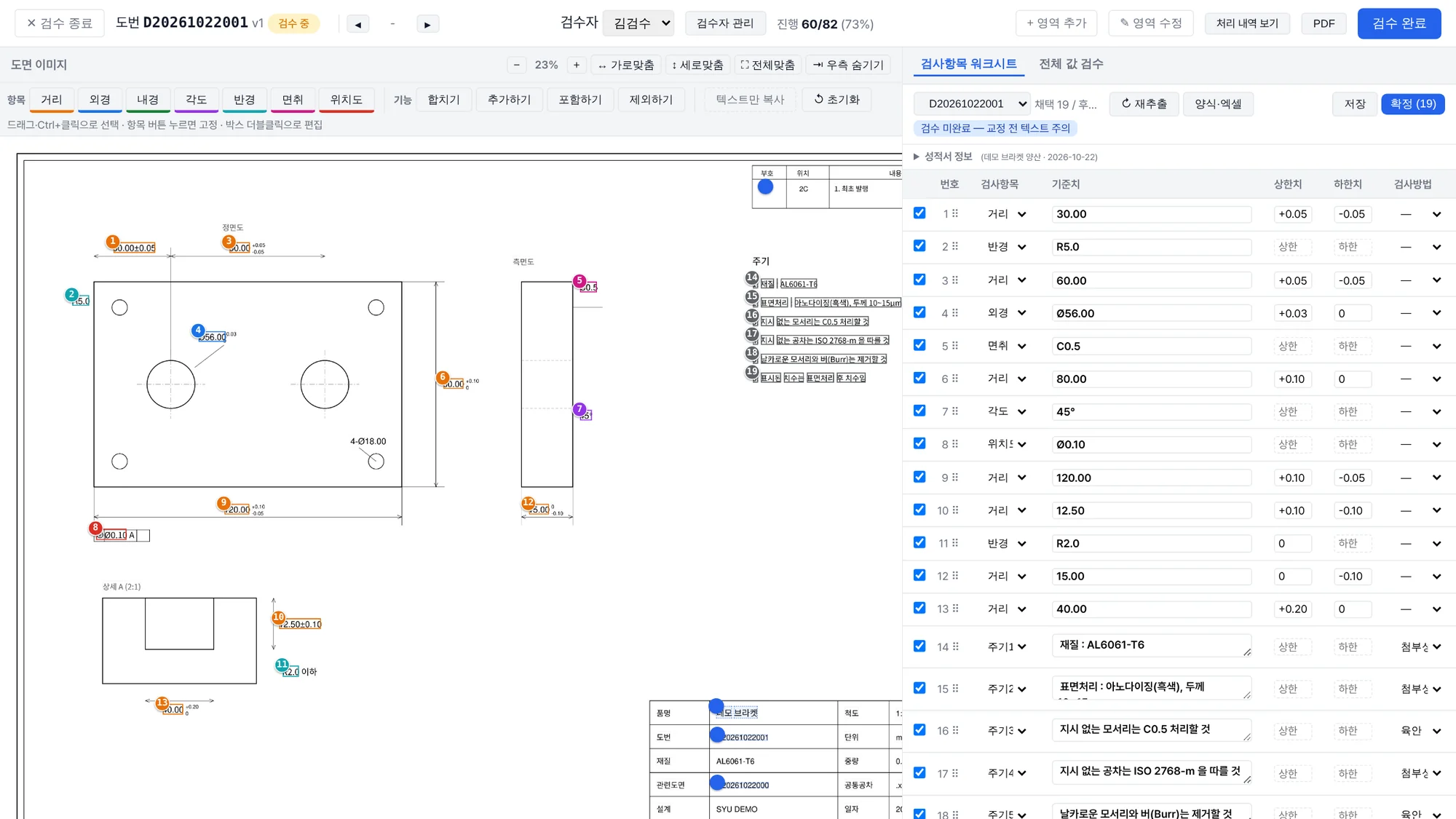
Compare dimensions, tolerances and notes extracted from a drawing PDF with their original locations. Correct values and item categories before approving them for output.
Place approved inspection items into the customer report form and use matching item numbers in a ballooned drawing PDF. Measurement and acceptance fields remain for the inspection team to complete.
These inspection items use a fictional drawing. The CSV illustrates item structure; it is not the customer-specific Excel inspection report output.
Review drawing quality and notation, dimension and tolerance recognition, necessary corrections, the report form and matching item numbers. Agree on the implementation scope and terms after evaluating the results.
Discuss a SYU OCR pilot| Manual workflow | With SYU OCR |
|---|---|
| Transcribe dimensions and tolerances line by line | Create an initial inspection worksheet from the drawing |
| Find omitted items and inconsistent numbering | Number items by drawing position and cross-check the balloon drawing |
| Re-enter the results and adjust the report format | Export Excel and print-ready reports in your company’s format |
| Review the implications of uploading drawings to external services | Process drawings on an on-premises PC without internet access |
Import A4–A0 drawing PDFs and multi-page sets through a watched folder or an upload. Files with unresolved drawing identifiers are collected for manual entry.
Organize linear, diameter, radius, angle, chamfer, position and note items. Separate stacked, ± and limit tolerances, and show item numbers at their drawing locations.
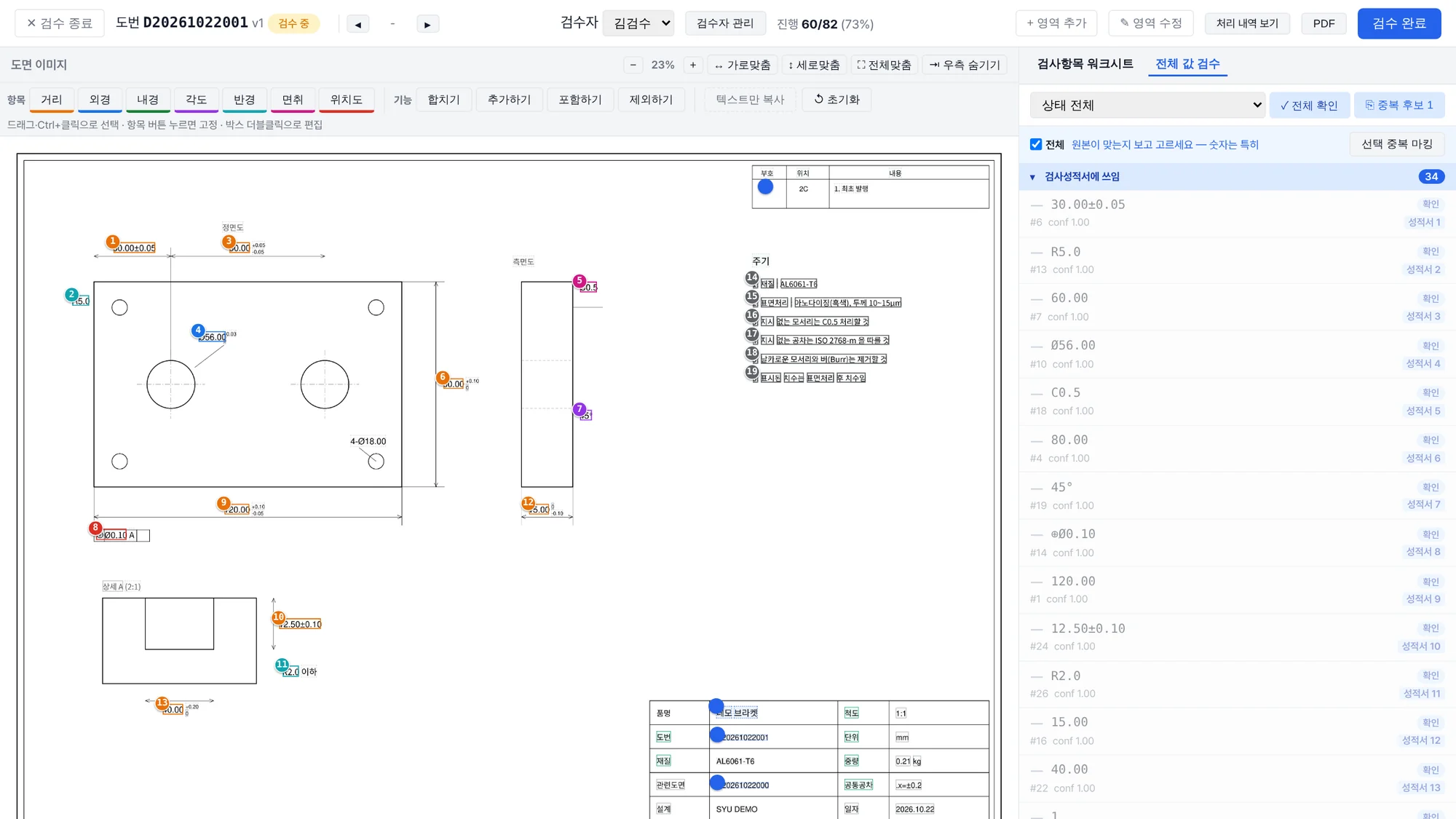
Compare the drawing with recognized values, correct text and regions, and adjust item types or inclusion in groups. Changes record who edited what and when.
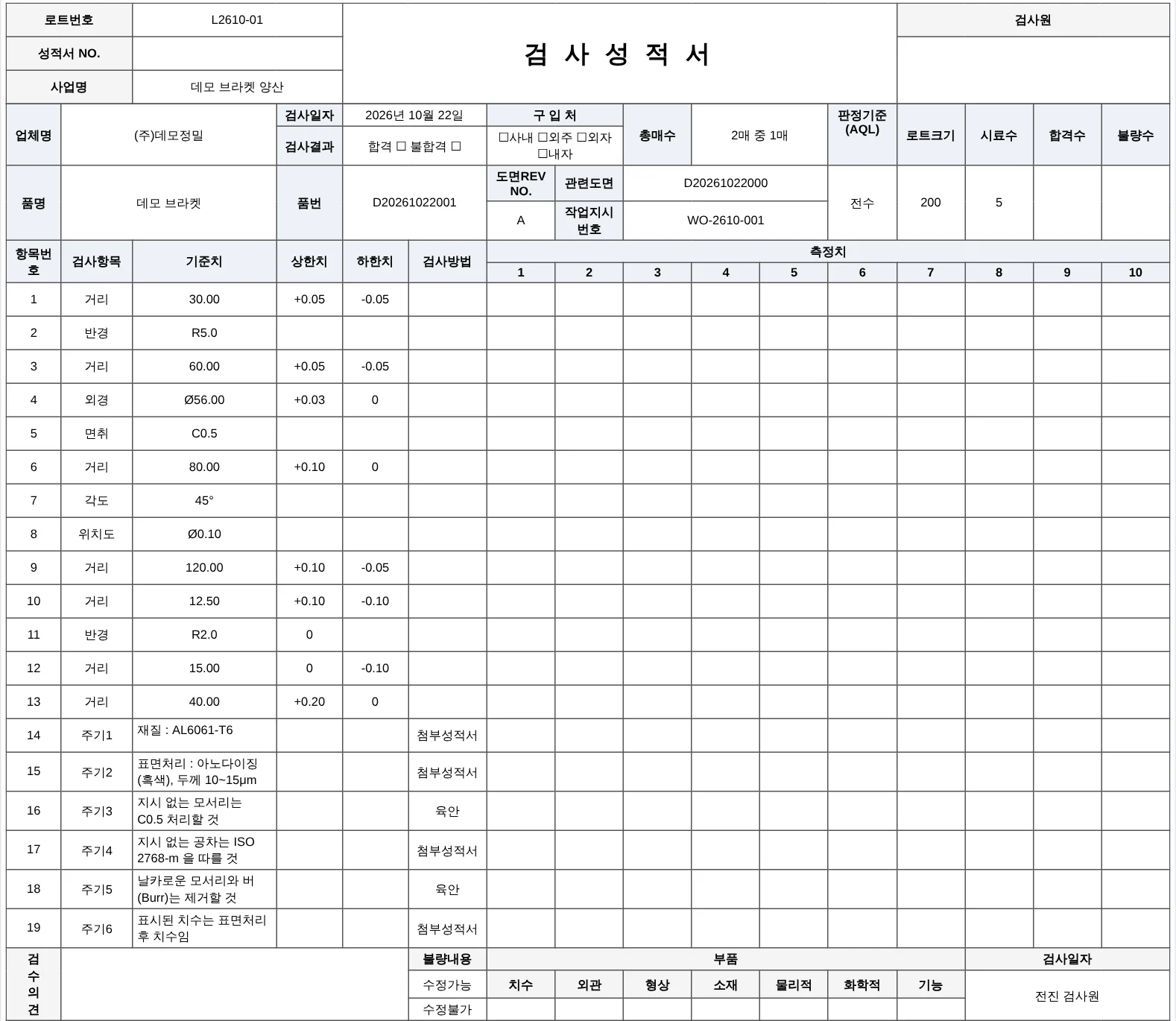
Populate the approved items into your inspection report format for Excel export or printing, alongside a balloon drawing PDF with matching item numbers.
Start with CAD-exported or printed PDFs, including multi-page drawing sets, using folder monitoring or screen upload.
Review nominal values and upper/lower tolerances by item. Match table entries to drawing numbers and select regions together to change types or include/exclude items.
Check the values used in the report first, correct misread text or regions, and review duplicate candidates before completing review and approving the result.
Reuse prior corrections when processing the same drawing, and use approved reports to suggest inspection items for other drawings. Review, edit and back up learned content through the interface.
Fill the template with part names/numbers, revision and related drawing details, project, inspection date and lot. Long item lists paginate with repeated headers. Measurement and acceptance fields remain blank for the actual inspection.
Place the same item numbers used in the report on the drawing, ordered around nearby dimensions. Export a PDF so inspectors can locate each dimension by its report number.
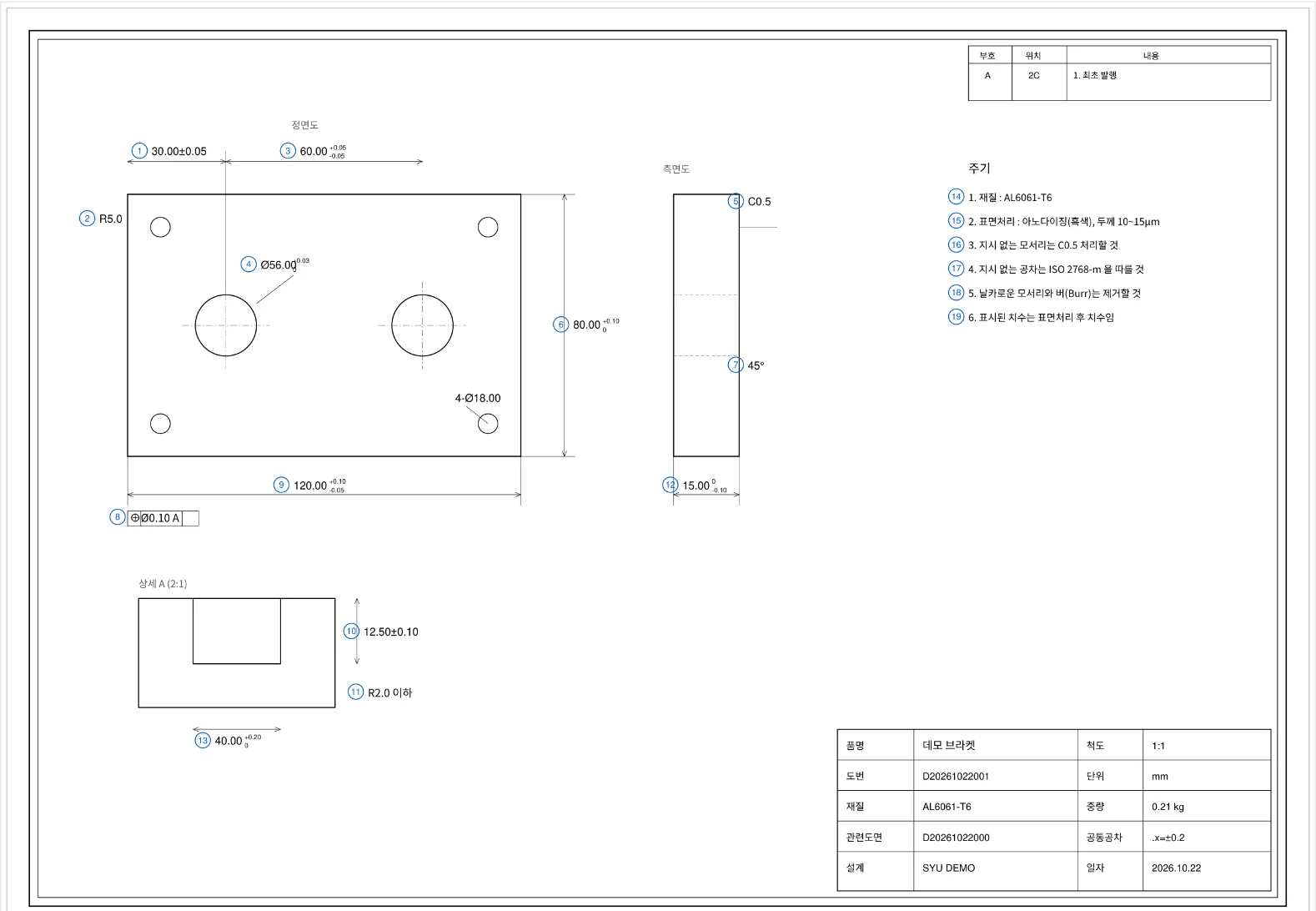
An on-premises implementation for precision-part drawings on an internet-isolated network. The results cover a representative drawing and a set of four A0 sheets.
Recognition results and processing times vary with drawing condition and the processing environment. Results are finalized after human review.
Install on an on-premises Windows PC or server. Configure report templates, drawing-number formats and item categories, then assess a small set of your drawings before deciding the rollout scope.
Discuss SYU OCRSYU OCR is installed on an internal Windows PC or server and processes drawings without an internet connection. Recognition and review take place internally without uploading drawings to an external service.
It accepts A4–A0 drawing PDFs and multi-drawing inputs, organizing dimensions, tolerances and notes into inspection items. A pilot confirms results for your actual drawings and drawing-number conventions.
Users compare the drawing and recognition results side by side and correct text, regions and item classifications. Review and correction history is retained, and confirmed items are used for output.
Inspection reports use your company’s template and can be exported to Excel or print. A balloon drawing PDF uses the same inspection item numbers. Actual measurements and judgments are entered during inspection.
Outline your drawing PDF formats, current inspection report template, drawing-number rules and intended PC or server environment. Agree on the scope and method of sharing materials during consultation, then confirm the implementation scope through a pilot.